

Beyond the Clipboard
Designing a Better Observation Tool: Reflections on Creation of The Nest Navigator
Teacher observations are one of those perennial rituals we all claim to value… until the calendar, context, or clipboard gets in the way. When they’re good, they’re genuinely energizing—windows into the craft, the chemistry, and the surprising moments that make classrooms breathe. When they’re not, they can feel like paperwork disguised as professional growth.
This week, Dr. Allison Schultz takes us inside that tension and asks a sharper question: What if the tools we use to observe teachers are the very things constraining the quality of our feedback? In classic Allison fashion, she doesn’t just name the problem—she builds a unique tool to fit her specific needs.
Her piece walks through the design and early testing of The Nest, a deceptively simple observation aid that prompts more authentic noticing, reduces habitual bias, and invites richer coaching conversations. It’s a thoughtful exploration of how we move beyond the default clipboard and toward something that actually strengthens teachers’ practice.
Enjoy this one. It’s a clear window into how our CTL team thinks, iterates, and keeps nudging the work forward. And as always, she leaves us with the right questions: What do we choose to see? What do our tools make us miss? And how do we design for better?

Teacher Observations….I think we all probably have a love/hate relationship with them. Getting into classrooms, seeing teachers and students in action, witnessing ah-ha moments and moments of genuine connection? Yes, please! Finding the time to do them, have the follow up conversations, document and log things, or show up only to find out the class is testing that day? Hard pass. The feedback and conversations afterward are 50/50. If I give only praise and encouragement, is it worth their time? If I have a coaching conversation with them, are we using time efficiently? When things don’t go well, well - having hard conversations is part of the job, but that doesn’t make it any more pleasant.
The Challenge of Using Someone Else’s Tool
What is pleasant is when a teacher invites you in, asks for feedback with a clear objective AND hands you a pre-made observation form to use as you observe. (Yes, this actually happened to me, I work with some amazing teachers!). Overall, it was a great experience, and I recognize that working with teachers at that level of self-awareness, forethought and drive to improve is a great privilege. But there was something tricky… filling out that pre-made observation form. I found myself really wondering about the meaning of the questions and rubric items.
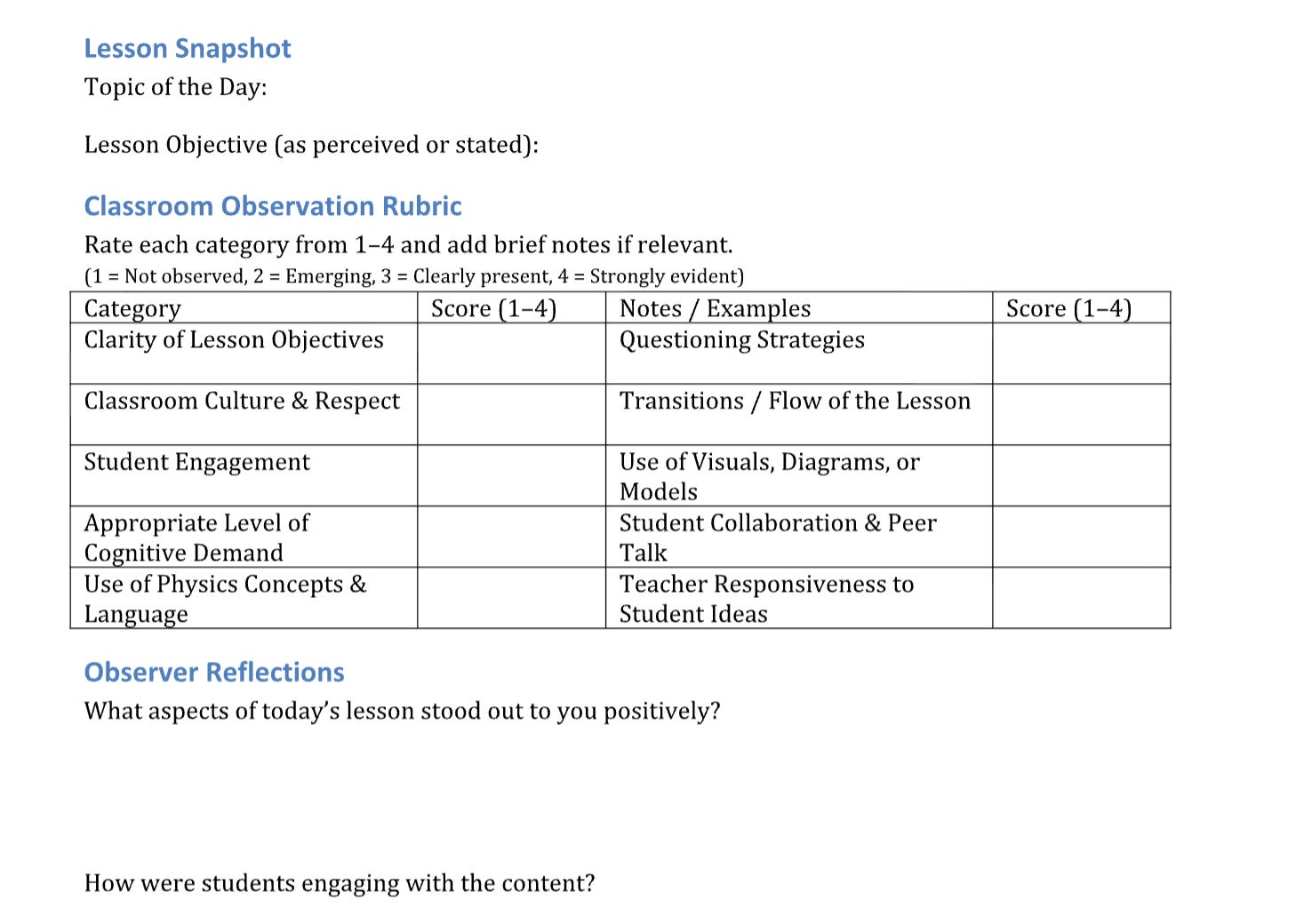
What was an “appropriate” level of cognitive demand?
Would she consider questions students asked “ideas”? Did that count as responsiveness?
I wrestled with these things not because I didn’t understand their importance in the classroom, indeed I was pleased she had included them, but I didn’t know how she was conceptualizing them. Like a teacher teaching from a scripted lesson, my feedback to her lacked a certain authenticity. More to come on that feeling later.
Enter: The Nest
Another story: One of the roles I serve here is the privilege of observing the early career teachers in my school each year. I get to go into their classrooms a few times a month and I follow up with feedback, always an email and often a conversation as well. Most years, we have cohort meetings of early career teachers where we dive into what’s going on in their classrooms (and lives). Because of schedules and the span of early career people we have (lower, middle and upper school with arts, music, math and science content areas), I decided that I would use The Nest - a tool created by a friend, Kevin Gregorio at St. Joe’s Prep - to facilitate our interactions. The Nest is an instructional coaching platform that is designed to, “create more good teaching in more classrooms, more of the time.” The Nest would allow me to cultivate a feeling of community across our disciplines and divisions via shout-outs and post observation celebrations. Lastly, The Nest prioritizes five questions for coaches:
“How are you ensuring you have 100% of students’ attention?”
“How are you communicating ideas effectively?”
“How are you challenging students to think deeply?”
“How are you ensuring every student gets the feedback they need?”
“How do you know what students know?”
I appreciated that these questions both aligned with my instructional priorities for my teachers while also expanding my areas of typical focus. I started out using the tool with just shout-outs this fall, which was easy enough. But when it was time to dive into the next layer and begin recording drop-in observation reflections, I found that my notes weren’t setting me up to use the tool as well as they could be. Again, I was working with someone else’s tool, and I craved that creative ownership that would allow me to make the most out of my observations.
Creating The Nest Navigator
There is power in the simplicity of the five guiding questions, but I wanted something that would break those overarching themes down into the smaller observable components in the classroom. So I began tinkering with creating a tool that would go along with the five essential questions but would also cue and support me to notice all the different things going on in the classroom. My tool, which I have called The Nest Navigator, takes the questions and gives examples of specific look-fors that might demonstrate strength in that area. For example, The Nest asks, “How are you challenging students to think deeply?” and so on the tool I included checkboxes for Inquiry, Problem Solving, Higher-order questions (create, justify, explain), Peer Teaching, etc., as well as space to note if the teacher did something else that fit in that category.
A big part of my motivation for creating The Nest Navigator was to reduce my own biases during classroom observations. Over the years, I’ve realized that my attention tends to gravitate toward certain teaching moves—how teachers ask questions, whether all students have a chance to respond, and the balance between teacher and student talk. While these are important elements, they represent only a small slice of what’s happening in a dynamic classroom. Research shows that teachers often default to calling on one eager student who can provide the correct answer and then move on, assuming the rest of the class is equally ready to proceed. This creates the illusion that learning is happening uniformly, when in reality, some students may be confused or disengaged. Recognizing and addressing this gap is essential, but it’s only one piece of effective teaching. I also wanted a tool that would help me see both the teacher’s strengths and potential areas for growth—supporting a balanced, forward-looking conversation. Ultimately, The Nest Navigator helps me capture a fuller, more nuanced picture of what’s unfolding in the classroom without relying solely on what my eyes are already trained to notice.
Testing in the Wild
Thanks to some grade level trips, I had a morning free to pull my favorite instructional coaching materials (thank you, Jim Knight!) and synthesize them with the information on The Nest to create this tool. I started with sketching out what I was thinking on good old fashioned pencil and paper, considered using Canva but ultimately went with a good old Google Doc to create my tool. Eager not to let better be the enemy of good enough, I took the one page template straight to a few classes for testing in the wild.
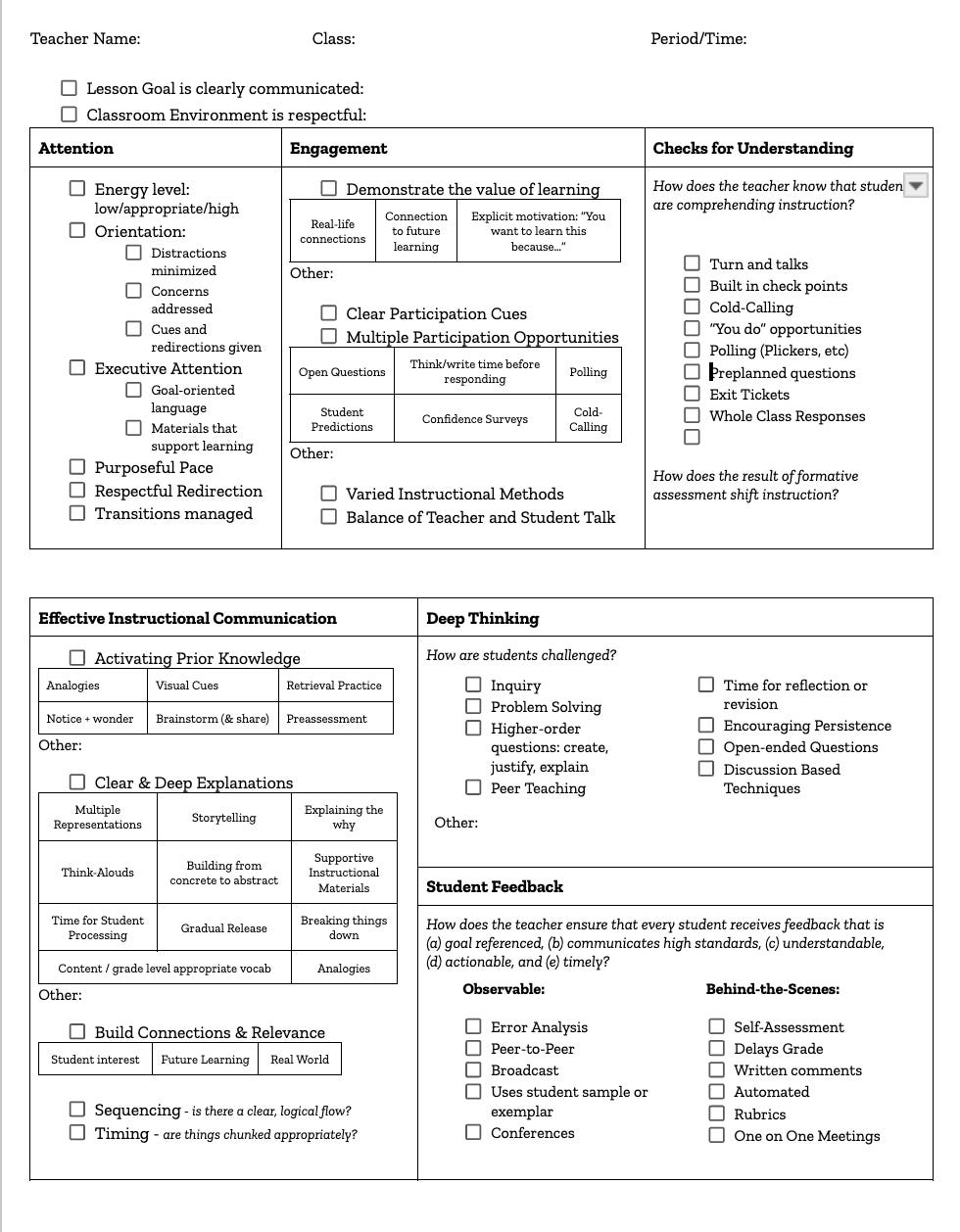
What I liked:
The small boxes under the checkboxes with illustrative examples helped me record what was going on in classrooms with a quick circle, and lots of circles in the same area helped me to identify a true strength.
Just enough white space to make small notes to myself, but within the given area of focus.
How it allowed me to expand my “look for the good” mentality with even more things to look for.
If I didn’t record anything in a given area, it prompted me to have a follow up conversation about that.
What still needs work:
Not everything a teacher does to prepare for class is observable. To truly answer all of the questions, I’ll need to chat with teachers. I see this as an opportunity to bring this tool into coaching conversations.
The tool isn’t linear, which makes catching everything challenging, but in the dynamic context that is teacher observation I think this is okay.
As my observations are non-evaluative, this big one page tool feels very “official” - I think I’ll need to do some PR work to help teachers understand why I’m shifting from my tiny notebook to this clipboard style method! I want to guard against teachers feeling like I’m coming in to make sure they are checking off all the boxes and help them understand that this tool is a memory prompt and a conversation guide.
Onwards and Upwards
Evaluating teaching, much like teaching itself, is an ever changing practice. I’m grateful to work in a profession and at an institution that encourages thoughtful reflection on how to improve the important work we do.
What do you think? I would love to hear your thoughts on The Nest Navigator.
How often are you talking with other academic leaders in your community about observation and how it’s done?
How can we create ownership of shared tools?
What are you drawn to observing in a classroom? Why those things?